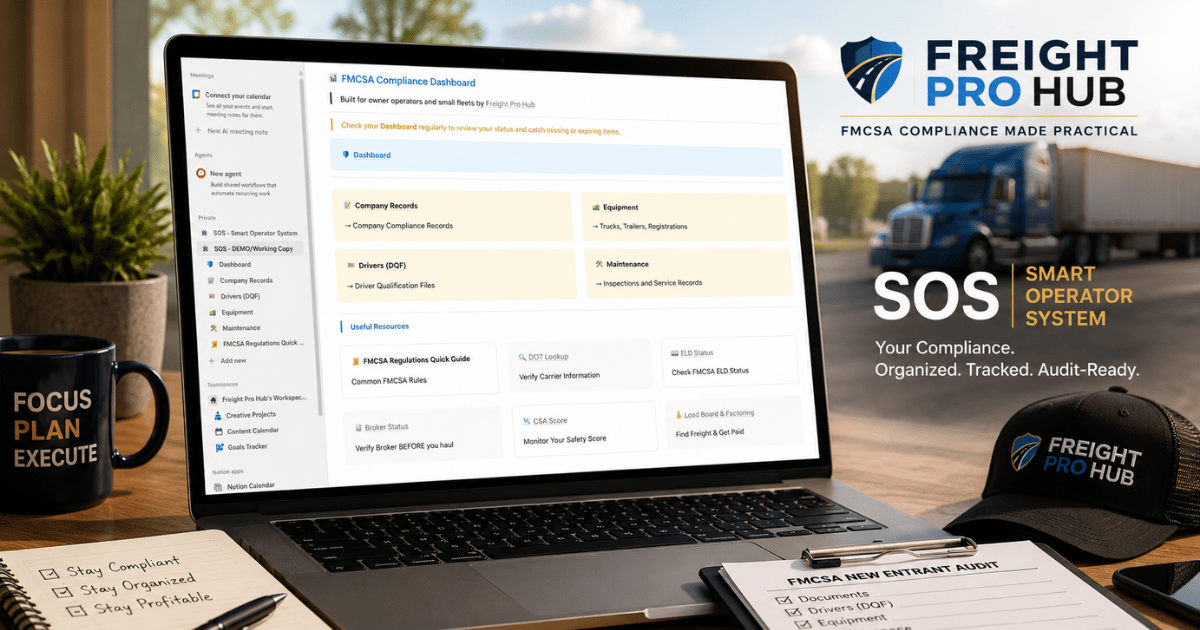
Know What’s Missing Before FMCSA Asks for It.
FMCSA compliance for owner-operators and small fleets is easier to manage when company, driver, equipment, and maintenance records are organized in one clear system. SOS helps you track important dates, see what is missing, and prepare before an audit request arrives.
- See missing, expired, and coming-due items at a glance
- Keep your compliance paperwork organized and easier to find
- Prepare for the FMCSA New Entrant Audit without digging through scattered files

Having the paperwork is not the same as having control of it.
When records are spread across email, phones, computer folders, and glove boxes, it becomes harder to know what is current, what is missing, and what needs attention next.
Records are scattered
Company, driver, equipment, and maintenance records often end up stored in different places with no consistent system.
Important dates get missed
Expiration dates, annual reviews, inspections, and service dates are difficult to manage when they are buried inside individual files.
There is no quick answer
When you need to know whether the company is in good shape, you have to open folders and check records one by one.
SOS turns scattered records into a simple system you can check, understand, and act on.
See how SOS organizes the operation one section at a time.
Open each view below to see how SOS brings company, driver, equipment, and maintenance information into one practical compliance system.
Click any section to expand the full screenshot.
01 Compliance Status Dashboard See green, yellow, and red status indicators in one quick overview.
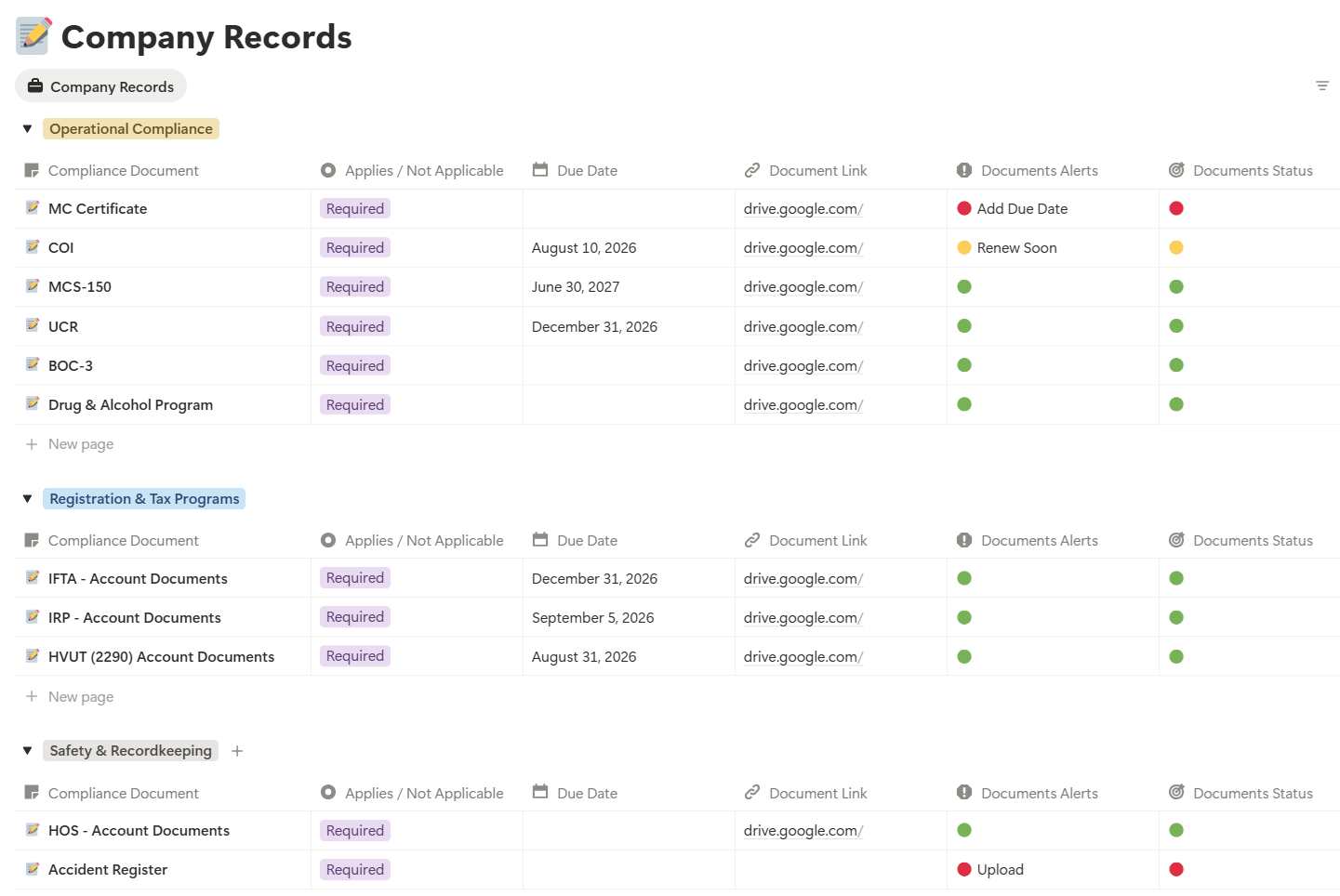
02 Company Compliance Records Track required documents, registration, taxes, permits, and other company records.
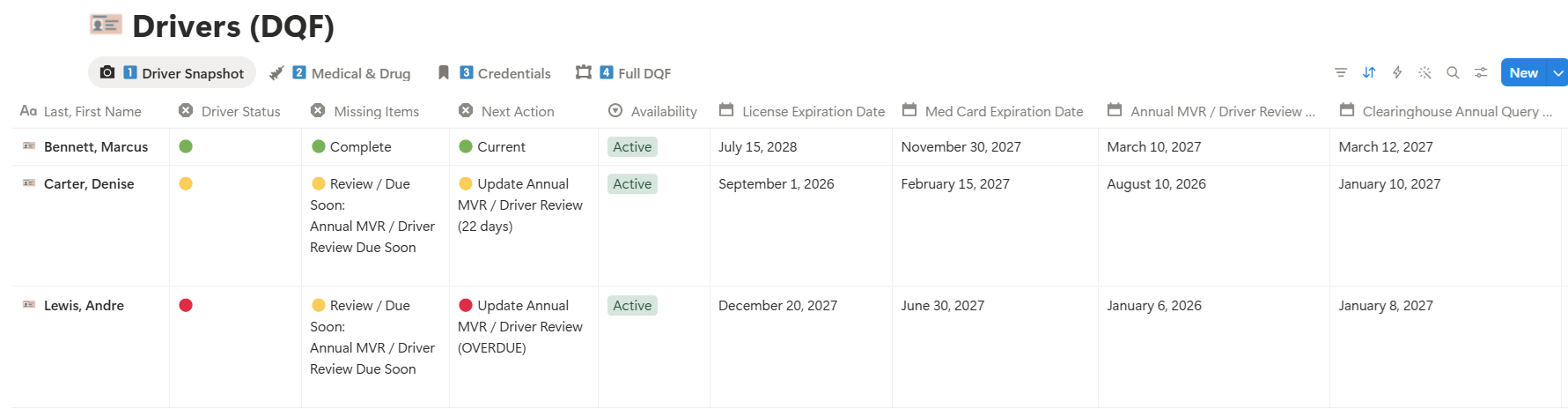
03 Driver Qualification File Snapshot See credentials, medical information, reviews, queries, and missing driver-file items.
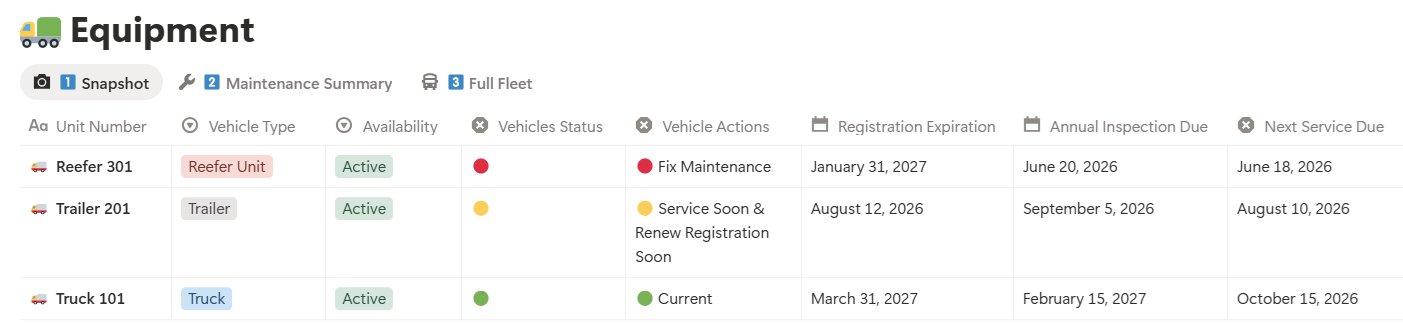
04 Equipment Compliance Snapshot Monitor trucks, trailers, inspections, registration, and service status.
05 Truck Maintenance Log Record completed service and track what is due next.
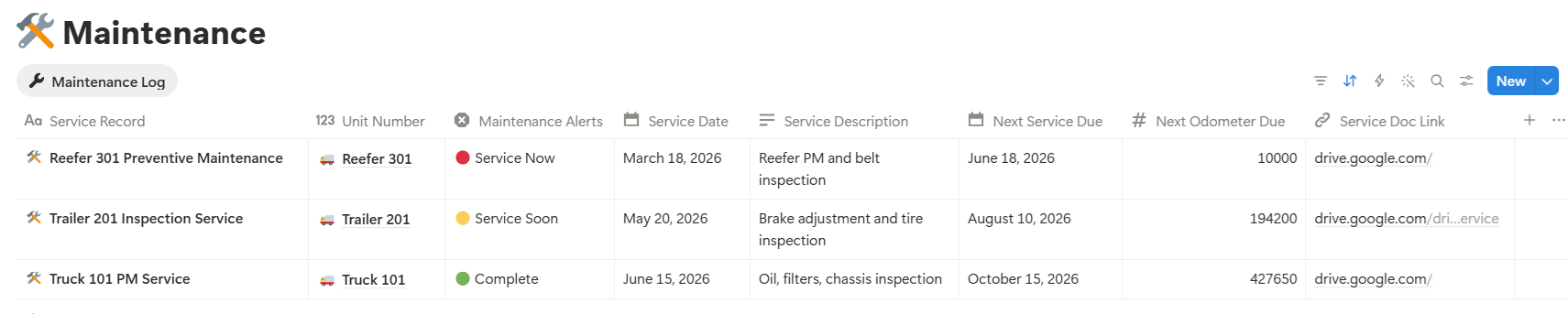
06 Action-Required Dashboard Example See how SOS identifies areas that are missing information or require immediate attention.

Check the dashboard
Start with the company, driver, equipment, and maintenance status instead of opening every file.
Open the area that needs attention
Review the correct section to see missing items, important dates, and the next action that needs to be handled.
Go directly to the supporting record
Use the saved links inside SOS to open the corresponding documents stored in your organized Google Drive folders.
SOS was built by someone who understands both the truck and the paperwork.
Freight Pro Hub founder Carlton Kornegay is a former owner-operator, coast-to-coast reefer driver, and U.S. Army Persian Gulf War veteran. He has managed equipment, maintenance schedules, service records, and the paperwork that keeps an operation moving.
Small carriers do not need another complicated fleet-management platform. They need a practical way to organize their records, track important dates, and quickly see what needs attention. SOS was built to give new owner-operators and one-to-five-truck fleets that control.

Former owner-operator, experienced reefer driver, military equipment manager, and the operator behind SOS.
Coast-to-coast trucking experience
Drove temperature-controlled freight across 46 states and understands the daily pressure of running the truck while managing the business behind it.
Equipment and maintenance accountability
Managed parts, service scheduling, and maintenance records for more than 200 pieces of equipment during military service.
Designed for small carriers
SOS is focused on new owner-operators and fleets operating one to five trucks—not large fleets with full compliance departments.
SOS is built for small carriers who want more control—not more complexity.
SOS is a do-it-yourself organization and tracking system. It gives you the structure, but you remain responsible for adding, maintaining, and reviewing your company’s records.
Choose SOS if you are ready to build a clear compliance system.
- You are a new owner-operator or small fleet operating one to five trucks.
- You are preparing for the FMCSA New Entrant Audit or want to get organized before receiving an audit request.
- Your records are currently spread across folders, email, phones, or paper files.
- You want to track missing items, expiration dates, reviews, inspections, and maintenance.
- You are willing to complete the setup and keep your information updated.
SOS is not a replacement for every service your business may need.
- A done-for-you compliance management service that maintains every record for you.
- A guarantee that your company will pass an audit or avoid enforcement action.
- A full transportation management, dispatch, accounting, ELD, or payroll platform.
- Large fleets that need enterprise permissions, automation, and multiple compliance departments.
- Operators who do not plan to complete the setup or update records as things change.
The system is simple, but it still needs your input.
Think of SOS like a maintenance schedule: the system shows you what needs attention, but the operator still has to enter the information and handle the work.
A free Notion account
SOS uses Notion as the control center where you track status, dates, links, and next actions.
A Google Drive account
Your actual company, driver, and equipment documents are stored in your own organized Drive folders.
Your compliance records
You will upload your own documents, enter important dates, and paste the file links into SOS.
Time to complete the setup
A setup video is included to walk you through duplicating SOS, building the folders, and connecting the records.
One-time purchase · DIY setup · Setup video included · 30-day refund window